Photoshop Overnight? What AI Can Do in a Few Hours (and What It Can't)
I took an abandoned open-source editor, miniPaint, and let AI add Photoshop- and GIMP-inspired features overnight. By morning I had a PWA that resembles Photoshop. Free, MIT licensed.
Can you build Photoshop overnight? Of course not. But can you, in a few hours, turn an abandoned open-source editor into something that resembles Photoshop closely enough that someone who knows it can find their way around? That, surprisingly, you can.
This article is not a how-to, and it doesn’t claim that AI can do overnight what the Photoshop team built over more than 35 years. It’s notes from an experiment: what I did, what came out of it, and what I take away about developing with AI. And also about everything AI can pull off in those few hours if you let it work.
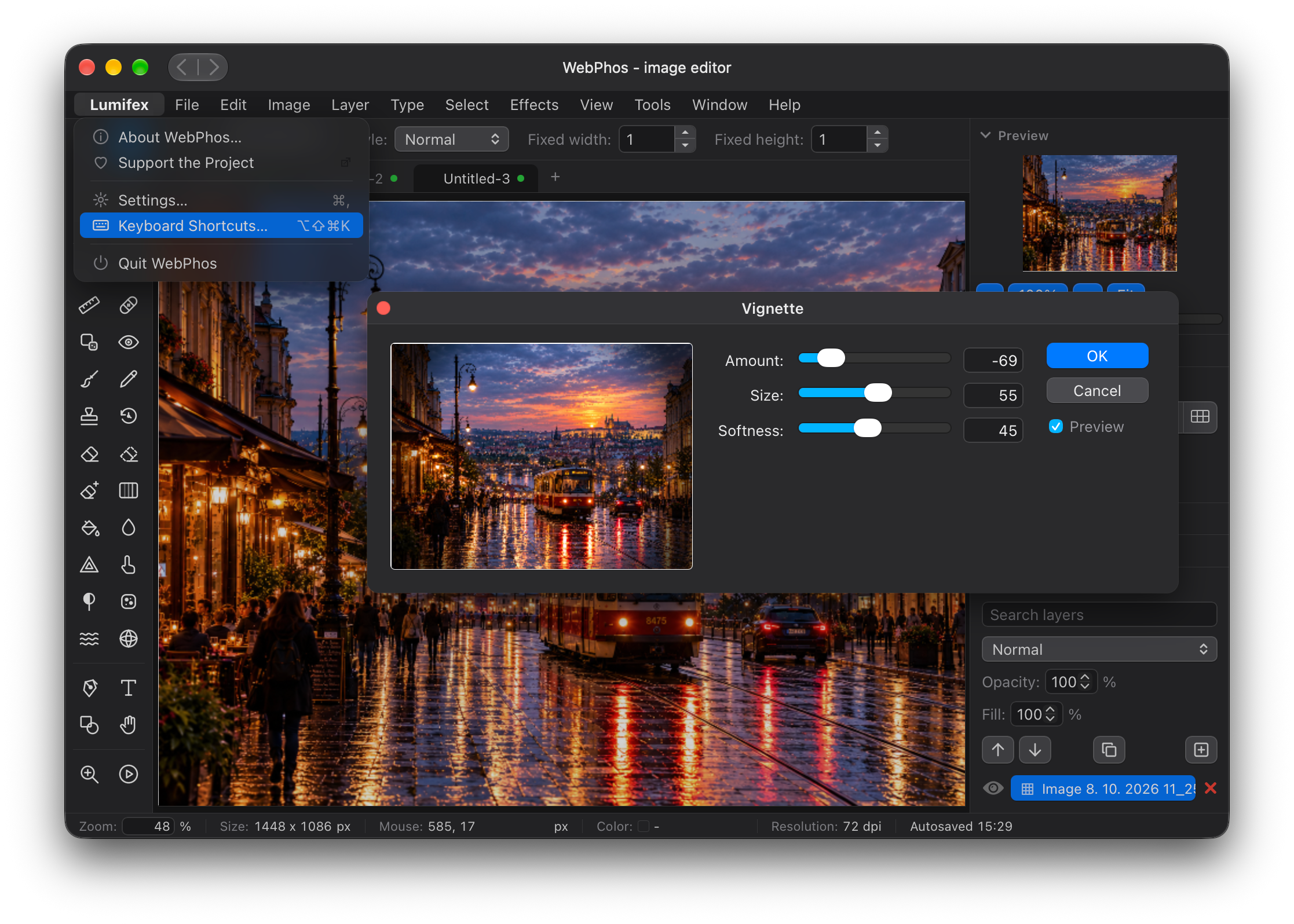
The result: you can try Lumifex right now at https://lumifex.80.cz. It’s free and open, and the source code is on GitHub.
1. Where it came from: Photoshop, GIMP and the price
A long time ago I worked at a graphic design studio (not as a designer), and that’s where I got to know Photoshop. I liked it. But at home I only had it for fun, not for paid work, and my willingness to pay its price matched that.
The world has moved on since then:
- GIMP: back then it put me off with its completely different controls. I got used to it later, but the first impression stuck.
- Web editors: Photopea, Graphite and others. You can edit photos in the browser, with no installation.
- Adobe itself offers Photoshop online, but only as part of a subscription that is definitely not the cheapest.
2. The trigger: a 1 GB web app
Then I read about Photon Studio: its developer reportedly spent around $ 2,000 on tokens, and the result was a free editor with layers, masks and PSD support. That caught my attention, so I downloaded it. And I was surprised: the app was roughly 1 GB, with Electron bundled inside. In other words, a web app in a box with its own browser.
That provoked me: try something similar, but better and cheaper.
3. The starting point: miniPaint
I didn’t want to start from scratch. I found the open-source project miniPaint by ViliusL: an online image editor in plain JavaScript that runs entirely in the browser (no framework). It had one drawback: for about half a year almost nothing had happened in it (the last commit was in April 2026).
Which is ideal for an experiment. A working foundation, an MIT license, and no team whose work I’d be breaking.
4. The brief for the AI: almost none
I didn’t write a long specification. There were basically two instructions:
- “Suggest 200 features that would be good to extend the existing project with”, inspired by Photoshop, GIMP and other photo-processing programs.
- “Build it. And make it resemble Photoshop, so it’s easy to use for people who know it.”
Then I let the AI work overnight, as one long run. I don’t know exactly how many hours it took, but after roughly ten hours it was done by morning. Along the way it also had to cope with the five-hour limits of the subscription: when the tokens in one window ran out, it waited for the next.
5. What the AI accomplished in a few hours
By morning I had an application that really did resemble Photoshop. A few highlights (the full list is in the CHANGELOG):
- Look and interface: the look of macOS with the structure of Photoshop; Layers, History, Histogram and Navigator panels; rulers and guides; dark, light and high-contrast themes; a command palette; Photoshop-style keyboard shortcuts.
- Documents: several documents in tabs, autosave with restore after start, DPI and units (px, in, cm, mm, pt, pica), export to PDF, ZIP with several sizes, app icons, SVG import.
- Selections and masks: rectangle, ellipse, lasso, magic wand, quick select, quick mask, color range, sky and subject selection, edge refinement with live preview, saved selections, layer masks, background removal.
- Layers: styles (shadow, glow, stroke, bevel and emboss, color and gradient overlay), groups, blend modes, locks, color labels, free transform.
- Adjustments: levels, curves with a histogram, hue/saturation, selective color, gradient map, channel mixer, LUTs (
.cube) and more. - Effects: over ten kinds of blur, sharpening, noise, tilt-shift, vignette, HDR, halftone, chromatic aberration, palette reduction, pixel art, liquify and plenty more.
- Retouching: healing brush, red-eye removal, clone, smudge, dodge and burn.
Of the original 200 suggested features, most are done.
App size
Unpacked, Lumifex is about 3.3 MB. Photon Studio was around 1 GB. A web app that runs in the browser (or as an installed PWA) simply doesn’t need its own browser in a box.
6. And it worked on the first try
Basically everything worked on the first attempt. That wasn’t luck: the AI wrote its own tests and tested everything itself. The repository now has 488 tests (Jest), plus ESLint and type checking. So in the morning I didn’t get a pile of broken features, but a foundation I could build on.
It’s true that some features work only partially. Not because the AI wrote them badly, but because it decided that polishing them to the last detail wasn’t important. It was mostly small stuff.
7. Why it worked (and when it doesn’t)
When the AI knows that kind of application and has an idea of what it should be, and you don’t insist that it has to be exactly the way you imagine it, development is nearly effortless and quite fast.
An image editor is a beautiful example. Photoshop, GIMP, layers, masks, curves: all of that is in the training data thousands of times over. The AI didn’t have to guess what a “layer” or a “curve” means. I didn’t have to explain what I had in mind. It was enough to say “make it look like Photoshop”.
With something one-of-a-kind it’s different. When I wrote PgArachne (a CLI gateway from PostgreSQL functions to JSON-RPC, with no GUI), the AI had few precedents to draw on, so I had to explain every little thing in quite some detail. The more original the project, the more work the human has describing it. The better known it is, the more it’s enough to just point the way.
8. What it isn’t
Let’s not kid ourselves, you or me:
- It isn’t Photoshop. Adobe’s team has been working on it for more than 35 years. You can’t replace that overnight.
- It isn’t a comparable product. Lumifex is a PWA: a web application that runs in the browser but can be installed and launched like a regular app. It has different limits (memory, performance on large images, formats) and different advantages (no installation, the same everywhere, 3.3 MB).
- Lots of things are missing. CMYK doesn’t work, nor do RAW and other specialized graphics formats, nor color profiles, and quite a lot more. Some of it simply didn’t get done or would be hard to program. Some of it can’t be done by its very nature, because the app runs in a web browser.
9. Privacy: everything stays with you
Lumifex processes images only locally in the browser. Nothing is sent anywhere. I even removed the image search tool and external links. And if you want to be sure nothing is left behind, there’s a Privacy dialog that clears the data stored in the browser (autosave, saved selections, settings).
10. Free and MIT licensed
Lumifex is freely available under the MIT license. You can use it, modify it, deploy it on your own server or build it into your own project however you like. And if basic to fairly advanced photo editing is enough for you, you may save on some paid services.
11. Thanks
None of this would exist without the people who came before:
- ViliusL and the other authors of miniPaint: for a clean, working foundation to build on. Lumifex is derived from it (the original author’s copyright is in the LICENSE).
- The authors of Photoshop, GIMP and other editors: for three and a half decades of development. They walked down the dead ends and found out what works and what doesn’t. Without them the AI would have had nothing to imitate and I’d have had nowhere to draw inspiration. It’s easy to build something “similar” to what someone else has already invented. It’s hard to invent it the first time.
12. What’s next
- Once I again have spare tokens from my prepaid plan (the ones that would otherwise expire), I’ll keep working on Lumifex. The first run cost me nothing extra, but let’s estimate what it cost anyway (see below). More on saving tokens is here.
- You can help: write an Issue on GitHub saying what you’d like in the editor. I’ll then tell the AI to take a look, and it will try to implement the reasonable suggestions.
What it cost
I didn’t count tokens exactly, but an estimate is possible:
- The run took roughly 12 hours and used about half of the weekly tokens of Anthropic’s cheapest subscription (Pro, around $ 20 a month).
- Because of the five-hour windows, it couldn’t have used more than the tokens from three windows.
- A monthly subscription works out to about $ 4 to $ 5 a week, so half the weekly limit corresponds to roughly $ 2 to $ 3 of the subscription price.
And since these were tokens that would otherwise have expired, it cost me nothing extra. Photon Studio reportedly burned $ 2,000 worth of tokens. Of course, that’s not the same scope or the same way of measuring (subscription vs. API prices), so it isn’t a fair comparison. But in orders of magnitude it shows that today it’s no longer a question of money, but of how to work with AI.
13. Closing thoughts: what follows from this
A few years ago this would have taken a team months. Today one person with AI does it overnight. Not perfectly, but usably.
Two things follow from it for me:
- AI can now do a surprising amount on its own, as long as it knows what it’s doing and we give it room. The worst thing I can do is cling to every detail. I point the direction, verify the result and let it work. It writes the tests itself.
- Abandoned projects are easy to resurrect. Open source that nobody has maintained for half a year doesn’t have to stay dead. You just take it, let the AI fill in what’s missing and give it back to the community. I tried something similar with OmniDB.
A question for you: which abandoned open-source projects would you bring back to life first?